
Social Selling Index Calculator
Free LinkedIn SSI score checker to see whether prospects understand, trust, and know how to contact you from your profile.
Do you use a clear profile photo and banner?
How to Use the Free LinkedIn SSI Score Checker
Use Sonarly as a free LinkedIn SSI score checker when you want a quick profile-based score without logging into LinkedIn. The check takes about 90 seconds. You don't need Sales Navigator or a paid LinkedIn subscription.
Option 1 - Sonarly's Free SSI Checker
Sonarly's SSI-style profile check gives you a practical answer: which visible profile signals help a buyer trust you, and which ones make the next step unclear. The report scores Profile Strength, Trust Signals, Network Relevance, and Content & Engagement, then turns the result into profile fixes. No login required, no data leaves your browser.
Option 2 - LinkedIn's SSI Dashboard
Log into LinkedIn and visit linkedin.com/sales/ssi. The page shows your total score, a breakdown per pillar, and two benchmarks. Your rank within your industry and your rank within your network.
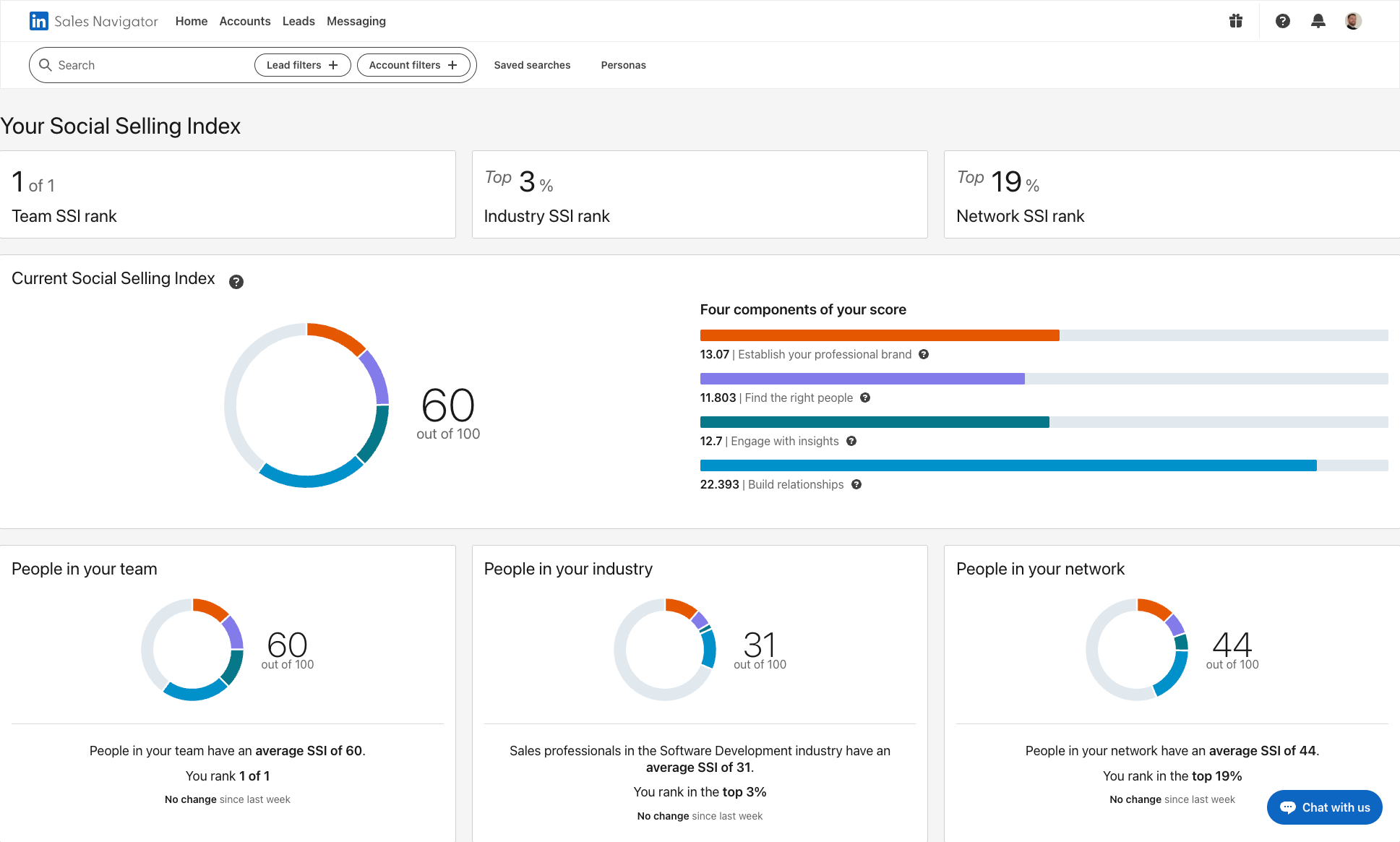
The difference between the two approaches matters. LinkedIn's native SSI updates daily but only shows four broad categories. Sonarly's report turns the same idea into profile changes you can actually make.
Use the breakdown to find the easiest win first. A profile that is already clear may only need stronger trust signals. A profile with no obvious next step may need a visible website, email, booking link, or useful resource.
What Is the Social Selling Index?
Social Selling Index definition: LinkedIn's Social Selling Index is a 0 to 100 score for recent social selling activity on LinkedIn. Use it to spot whether your profile, prospecting, content engagement, and relationships are strong enough to support sales conversations.
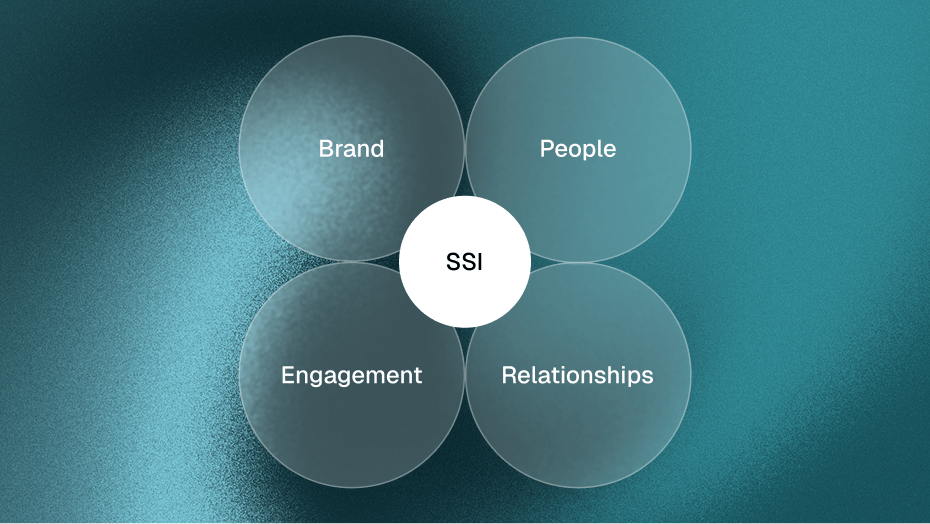
LinkedIn breaks your social selling index score into four equally weighted pillars. Each contributes up to 25 points.
- Establish your professional brand - profile completeness, content publishing, follower growth
- Find the right people - how well you use search and Sales Navigator to target prospects
- Engage with insights - sharing relevant content, commenting on industry discussions
- Build relationships - connection quality, response rates, relationship depth with decision-makers
Your score refreshes every day. It's not a lifetime average. It reflects what you've done in the last three months.
The useful part is not the number by itself. SSI turns scattered LinkedIn behavior into a short diagnostic you can compare over time.
For sales teams, the score is a coaching shortcut. It shows whether a rep needs a clearer profile, better prospect targeting, more visible engagement, or stronger relationships.
Keep the limit in view. SSI measures activity, not pipeline. A higher score suggests better LinkedIn habits, but the real goal is more trusted conversations with the right buyers.
What Your SSI Score Means
Your Social Selling Index score is a diagnostic, not a final verdict. Read it in three layers: the total score, the weakest pillar, and the benchmark against your industry or network.
- Total score - use this as a quick health check. A low score means LinkedIn sees too little selling activity or too little profile strength.
- Weakest pillar - fix the lowest pillar first. One weak area can hold back the whole score even if your profile looks complete.
- Benchmark rank - compare yourself with your industry and network, not with every LinkedIn member. A 65 can be strong in one market and average in another.
If you searched for my Social Selling Index, the practical next step is not just finding the number. It is deciding what to fix first. LinkedIn shows the activity score. Sonarly turns the same idea into profile-level guidance you can act on immediately.
Why Sonarly Checks Buyer-Facing Signals
LinkedIn's SSI was built in 2014. It measures activity, not whether your profile helps a buyer decide what to do next. Sonarly's Social Selling Index calculator takes a different approach by analyzing visible profile signals across four practical areas.
- Profile Strength (30%) - Profile photo, banner, headline, About section, and job entries that quickly explain who you help
- Trust Signals (25%) - Skills, recommendations, certificates, projects, articles, and examples that make you easier to trust
- Network Relevance (20%) - How intentionally you build a relevant network and how clearly your profile tells the right people what to do next
- Content & Engagement (25%) - Useful links, posts, comments, and examples that show what you know
The difference matters. LinkedIn's SSI rewards behaviors (did you use search? did you post?). Sonarly's score asks the buyer-facing question: does your profile make the next conversation easier?
That is the practical gap Sonarly fills. LinkedIn SSI tells you whether LinkedIn sees activity. Sonarly checks whether a buyer sees enough clarity, proof, and next-step confidence to start a conversation.
What to Fix in the Four SSI Pillars
Each pillar points to a different fix. Read the four pillars as a troubleshooting map, not as abstract LinkedIn terminology.
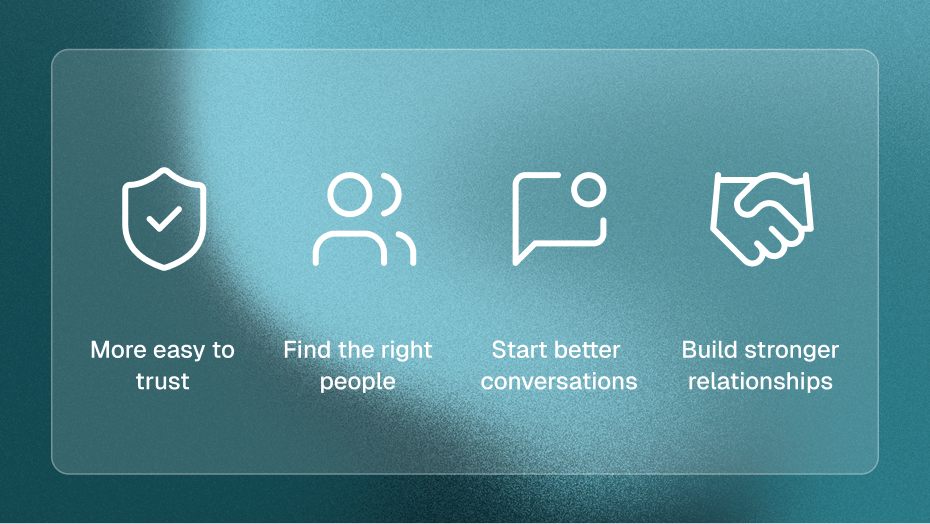
Make Your Brand Easy to Trust
This pillar helps answer a buyer's first question: can I quickly understand who this person helps and why I should trust them? LinkedIn looks at profile completeness, content publishing, endorsements, follower growth, and profile views.
If this pillar is weak, start with clarity: headline, About section, featured proof, and recent activity. A complete profile should make your value obvious before a prospect scrolls.
Find the Right People
This pillar shows whether your network-building is intentional. LinkedIn rewards search behavior, saved leads, Sales Navigator usage, and outreach toward people who match your ICP.
If the score is low, the fix is usually targeting discipline. Build smaller, more relevant lists, use filters, and connect with people who could actually buy, influence, or refer.
Start Better Conversations
This pillar shows whether you use content to create context for conversations. LinkedIn looks at sharing, commenting, publishing, and responding to discussions in your market.
If this score is weak, don't start by posting more. Start by commenting where your buyers already pay attention, then publish posts that answer recurring buyer questions.
Build Stronger Relationships
This pillar reflects relationship depth, not follower count. LinkedIn considers acceptance rates, response rates, and interactions with decision-makers.
If this pillar lags, improve the quality of each touchpoint. A smaller network of relevant people who recognize your name beats thousands of disconnected contacts.
Pillar summary
- Professional Brand - measures profile completeness, content, endorsements. Score high with a full profile, regular publishing, and rich media.
- Right People - measures search usage, lead saves, ICP targeting. Score high with advanced filters and proactive outreach.
- Engage with Insights - measures content sharing, commenting, article views. Score high with daily commenting and weekly original posts.
- Build Relationships - measures acceptance rates, InMail responses, depth. Score high with personalized requests and consistent engagement.
What Is a Good SSI Score?
A good SSI score is high enough to show that LinkedIn is not blocking your credibility or visibility. For most B2B sellers, the practical target is 70+ with no severely weak pillar.
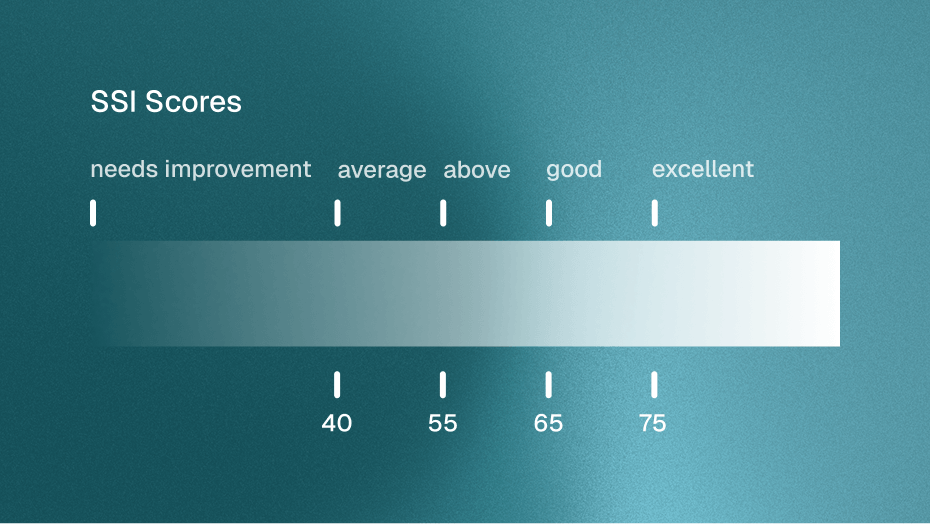
- 75 - 100 (Excellent) - Top performers. You're outpacing most of your industry and network.
- 65 - 74 (Very Good) - Strong presence. A few targeted improvements can push you higher.
- 55 - 64 (Above Average) - Solid foundation. One or two weak pillars are holding you back.
- 40 - 54 (Average) - Typical for most LinkedIn users. Significant room for growth.
- Below 40 (Needs Work) - Low activity or incomplete profile. Start with the basics.
LinkedIn also shows two comparison benchmarks on your SSI dashboard. Your rank within your industry (based on your listed job function) and your rank within your network (the people you're connected to).
These benchmarks matter more than the raw number. A score of 65 in a highly competitive industry like SaaS sales means something different than 65 in a niche market with fewer active sellers.
If you manage a sales team, use SSI to spot coaching priorities. Reps below 50 usually need basic profile and activity work; reps around 60 to 70 often need one focused pillar improvement.
How to Improve Your SSI Score
The best SSI improvements also make you easier to buy from. Prioritize actions that help prospects understand your value, see proof, and feel comfortable starting a conversation.
Clarify Your LinkedIn Profile
Your profile is the fastest fix because every visitor sees it before they reply, book, or connect.
- Headline - Skip the job title. Use a value statement that tells prospects what you help with. "Helping B2B sales teams book 3x more meetings" beats "Account Executive at Acme Corp."
- Summary - Write 3-4 short paragraphs. Lead with the problem you solve. Add a clear next step, like your website, email, or booking link.
- Featured section - Pin your best posts, case studies, or lead magnets here. Most profiles leave this empty.
- Skills and endorsements - Add 10+ relevant skills. Ask colleagues to endorse the top three.
- Profile photo and banner - Professional headshot. Banner that communicates your value prop or brand.
A clearer profile can lift the Professional Brand pillar quickly, but the better outcome is simpler: buyers understand why they should keep reading.
Publish Useful Buyer Content
Content should make buyers trust your judgment before they ever speak with you. Consistency helps, but relevance matters more than volume.
Aim for 2-3 useful posts per week. Use short examples from customer conversations, lessons from your work, market observations, and practical breakdowns your ICP can apply.
Avoid posting only company updates or reshared links. Original posts and thoughtful takes give prospects a reason to remember your point of view.
Protect Your Acceptance Rate
Connection requests affect both score and future conversations. Generic requests lower acceptance rates and make later outreach colder.
Mention something specific. A recent post they published, a mutual connection, or a shared challenge in their industry. Keep it under three sentences. Don't pitch in the connection request.
Target decision-makers in your ICP. Sales Navigator makes this easier with advanced filtering by seniority, company size, industry, and recent activity. But even LinkedIn's free search works if you combine the right keywords and filters.
Comment Where Buyers Pay Attention
This is often the fastest improvement because comments put your name in the right conversations without requiring a full content calendar.
Spend 15-20 minutes each morning engaging with posts from prospects, customers, and industry voices. Leave substantive comments. Three words don't count. Share your perspective, ask follow-up questions, or add a data point they missed.
This builds visibility before you ever send a DM. When you reach out later, your name is already familiar.
When SSI Helps Sales
SSI is useful when it helps you diagnose weak LinkedIn habits. It becomes a vanity metric when the team celebrates the number without checking whether it creates better conversations or pipeline.
LinkedIn's performance claims are correlations, not a guarantee. Reps with high SSI often have the same habits that produce pipeline: they are visible, disciplined, and relevant to buyers.
Here's what's more interesting. LinkedIn itself is pulling back from SSI. Their Sales Navigator page now states that the social selling index "no longer accurately reflects the modern sales environment" (LinkedIn, 2025). They're pushing AI-powered features instead, like Lead Finder, Message Assist, and Account Alerts.
That shift is telling. LinkedIn built SSI in an era when organic reach was high and social selling meant posting and connecting. The 2026 landscape looks different. Buyers are harder to reach. Content volume is exploding. And the signals that matter most, like buyer intent, job changes, and engagement patterns, aren't captured by SSI at all.
So should you still care about your score? Yes, but use it as a diagnostic, not a KPI. Check the weakest pillar, fix one behavior for two weeks, and then measure whether more relevant buyers view, connect, reply, or book.
See how Sonarly's social signals surface the buyer intent signals that SSI can't measure.
Frequently Asked Questions
The Social Selling Index is LinkedIn's 0 to 100 score for social selling activity. It matters because it helps sales professionals spot whether their LinkedIn presence, prospecting, engagement, and relationship-building habits are strong enough to create visibility and trust.
You can find your official LinkedIn SSI score at linkedin.com/sales/ssi while logged into LinkedIn. The dashboard shows your total score, four pillar scores, and benchmarks for your industry and network.
Your SSI score tells you how LinkedIn reads your social selling activity across profile strength, prospect discovery, content engagement, and relationships. Treat it as a direction signal. The most useful part is usually the weakest pillar, because that shows where improvement is most likely to move the score.
A useful social selling metric should combine profile clarity, trust signals, audience relevance, content engagement, and relationship quality. LinkedIn SSI measures four internal activity pillars. Sonarly focuses on the buyer-facing profile signals a prospect can actually see.
LinkedIn calculates the Social Selling Index across four pillars, each worth up to 25 points: establish your professional brand, find the right people, engage with insights, and build relationships. The official SSI score reflects recent LinkedIn activity and usually updates daily.
For most LinkedIn users, 40 to 50 is average. For B2B sales professionals, 70+ is strong and 75+ is a good target. The exact number matters less than the weakest pillar and whether your profile makes the next buyer conversation easier.
Start with the weakest pillar. Improve profile clarity, add trust signals, connect with more relevant people, comment on buyer-relevant posts, and publish useful content consistently. Small daily actions usually move SSI faster than one large profile rewrite.
Yes. LinkedIn's SSI dashboard tracks the official score, but it gives limited guidance. Sonarly's calculator helps diagnose profile-level fixes, while social signal tools track buyer intent signals such as job changes, engagement patterns, and account activity.
No. LinkedIn's dashboard at linkedin.com/sales/ssi is the official SSI score and uses internal LinkedIn activity data. Sonarly's free SSI checker is an independent profile check that shows whether a prospect can quickly understand, trust, and contact you.