
Free ICP Generator
Use the free ICP Generator to create a focused B2B ideal customer profile from one website URL. Get editable job titles, departments, employee count, industries, keywords, and locations.
Build your ICP from one URL
Use the free ICP Generator when you need a usable ideal customer profile before you build lists, qualify accounts, or write outreach. Paste one public website URL, generate a first ICP, then edit the fields until they match the market you actually want.
The result is a starting point, not a strategy deck. Keep what is specific, remove weak suggestions, and add missing context before you use the ICP in sales or marketing work.
That is the right level of detail for early targeting work. You should be able to look at the generated ICP and decide whether a company belongs in your first account list without debating every edge case.
Generate an ideal customer profile fast
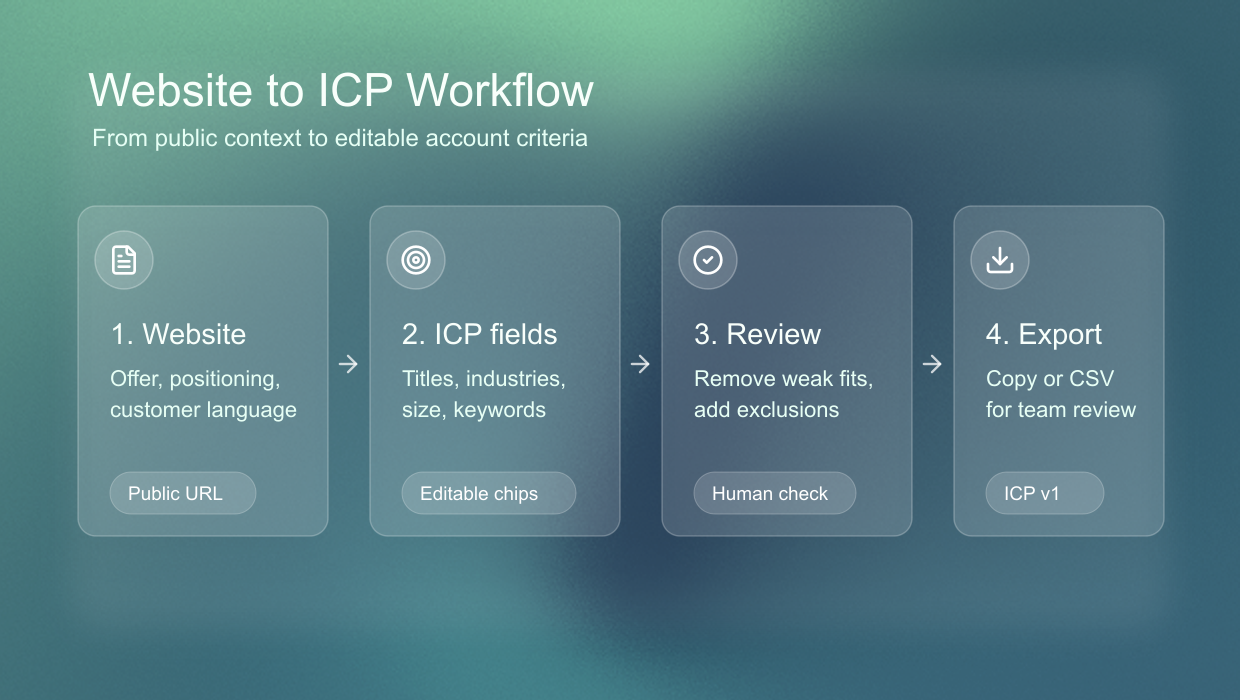
The tool reads public website context and turns the offer, positioning, and visible customer language into a compact B2B ideal customer profile. That makes it useful when you have a company website, but no clean targeting document yet.
This is especially useful for early-stage teams, consultants, agencies, and sales teams that inherit unclear positioning. Instead of asking everyone to define the ICP from memory, you can start with the website, then correct the generated version with what you know from real customers.
Review your ICP fields
A good ICP has enough structure to guide decisions. Sonarly returns editable fields you can review quickly instead of starting with a blank template.
Treat each field as a hypothesis. If a suggested industry feels too broad, narrow it. If a job title is close but not quite right, replace it with the title your buyers actually use. The value comes from turning vague targeting into fields you can test.
- Job titles for people who own, influence, or feel the problem.
- Departments where the problem usually lives.
- Employee count ranges that fit the offer and sales motion.
- Industries where the value proposition is easiest to understand.
- Keywords that support search, filtering, and message context.
- Locations that make the first go-to-market motion realistic.
ICP meaning for sales and business
ICP means ideal customer profile. In sales and business planning, it defines the company type most likely to buy, get value, stay, expand, and justify your attention.
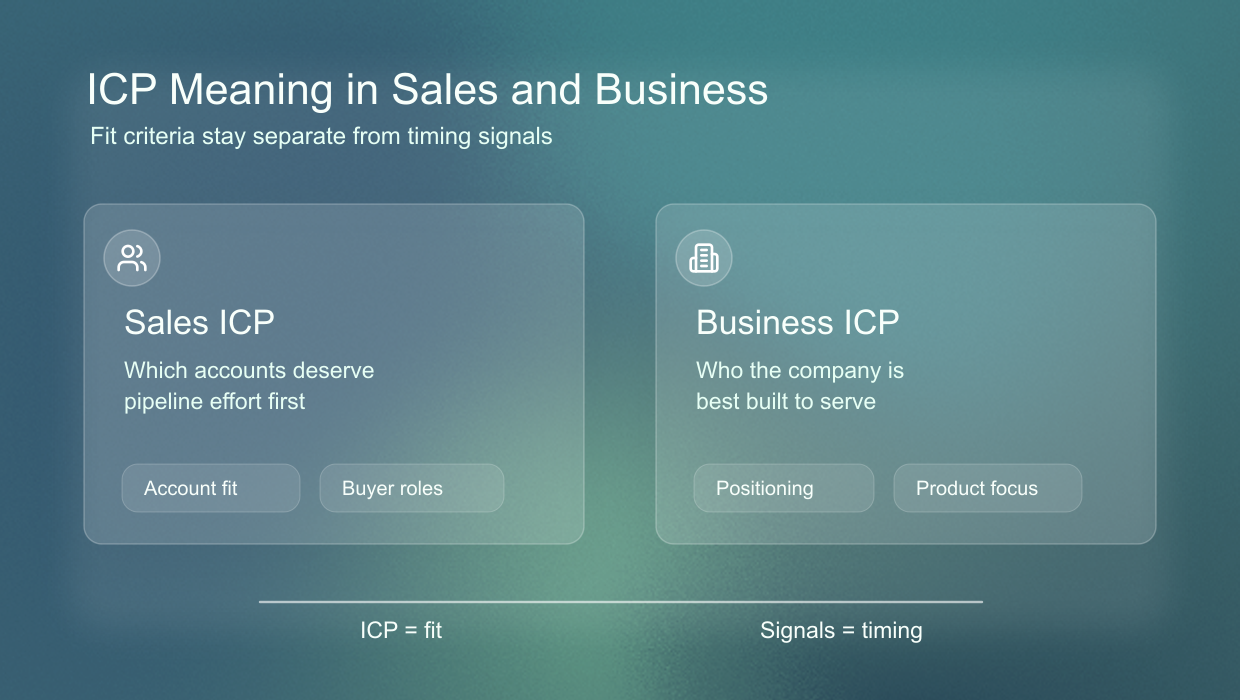
The word matters because it separates fit from timing. Your ICP says who is worth targeting. Buying signals, intent data, and recent activity tell you who deserves attention right now.
That separation prevents a common mistake. A company can show a strong signal and still be a poor fit. Another company can match your ICP perfectly, but have no reason to talk this week. Strong sales systems keep both ideas visible.
ICP meaning in sales
In sales, ICP means the account-level filter that tells a team which companies deserve pipeline effort. It helps reps avoid generic lists and focus on accounts where the problem, budget, authority, and use case are more likely to line up.
A sales ICP should be specific enough to change behavior. If it does not affect which accounts you research, which titles you contact, or which companies you reject, it is probably still too vague.
- Which industries should the team prioritize?
- Which company sizes are realistic buyers?
- Which departments and titles should be reviewed first?
- Which accounts look close, but should be disqualified?
ICP meaning in business
In business, ICP means a sharper definition of who the company is built to serve. It can guide positioning, pricing, onboarding, product feedback, support expectations, and the type of customers you choose to learn from.
A business ICP should be narrower than the total market. If it includes every company that could theoretically buy, it stops helping your team make tradeoffs.
For example, a product team can use the ICP to decide which feature requests matter most. A founder can use it to decide which case studies to write. A marketer can use it to decide which pain points deserve homepage space.
Keep ICP smaller than your market
Your total addressable market includes everyone who might buy someday. Your ICP is the slice you should prioritize now because the fit is stronger, the pain is clearer, and the sales motion is easier to repeat.
This smaller focus does not limit growth. It gives you a cleaner first motion. Once you know which account profile converts, you can expand into adjacent segments with better evidence and less guesswork.
What is an ideal customer profile?
An ideal customer profile describes the company that is most likely to become a strong customer for your offer. For B2B teams, it usually combines firmographics, buyer roles, problem fit, market context, and disqualification criteria.
A useful ICP is practical. It tells you which accounts to review first, which accounts to skip, and which details matter before you write a message or start a campaign.
The strongest ICPs are usually based on existing evidence. Look at customers who bought quickly, stayed active, expanded, referred others, or gave useful product feedback. Those accounts often reveal patterns that a broad market description hides.
- It narrows the market to accounts where the offer matters.
- It gives sales and marketing the same account definition.
- It separates company fit from individual buyer persona fit.
- It makes search, qualification, and messaging easier to review.
A weak ICP often sounds impressive because it covers a large market. A strong ICP feels more constrained, but it gives your team a clearer reason to choose one account over another.
Ideal customer profile template fields
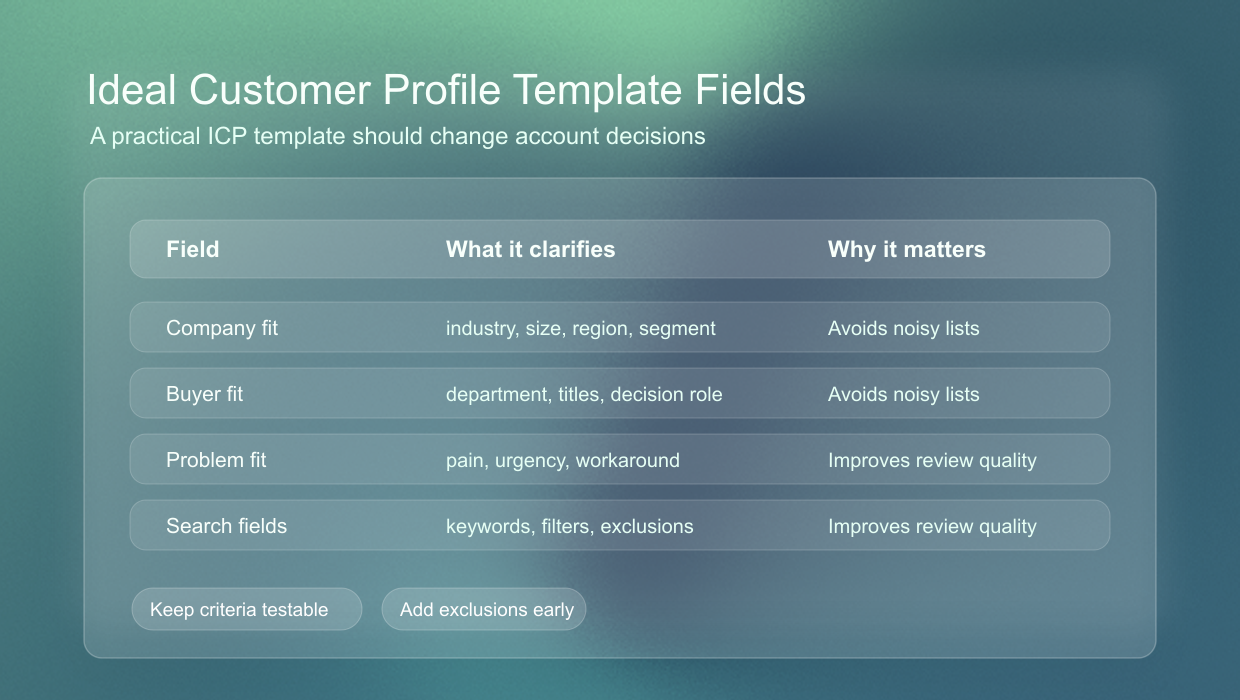
An ideal customer profile template should be clear enough for another person to use without a long explanation. The goal is not to fill every possible field. The goal is to define the account criteria that change your decisions.
Start with the fields that affect qualification. You can always add more detail later, but an ICP template becomes hard to use when it mixes core criteria, nice-to-have signals, and random notes in one place.
ICP company fit
Company fit covers the account attributes that make a customer realistic and valuable. Start with industry, company size, geography, business model, growth stage, and market segment.
These fields help you avoid false positives. A company can have the right problem, but still be too small, too regulated, too local, too enterprise, or too different from your strongest customer base.
ICP buyer fit
Buyer fit describes the people inside the account who care about the problem. Include departments, job titles, decision makers, influencers, and the language those people use to describe the pain.
This section should not become a list of every possible stakeholder. Pick the roles that can feel the pain, influence the decision, or approve the next step. Otherwise the ICP will create noisy contact lists.
ICP problem fit
Problem fit keeps the ICP from becoming a loose demographic list. Write down the pain, current workaround, urgency, budget reason, and the outcome that would make the account care.
This is where many ICPs become useful. Two companies can look identical by industry and size, but only one may have the urgent problem your product solves. Problem fit explains the difference.
ICP search fields
Search fields translate the ICP into practical filters. Use job titles, departments, employee count, industries, keywords, locations, and clear exclusions so the ICP can be used in a tool or sheet.
Keep the search fields close to the words your buyers and companies use publicly. That makes the ICP easier to reuse in LinkedIn, Sales Navigator, CRM views, spreadsheets, and manual account review.
ICP examples for sharper targeting
ICP examples make the difference between broad and useful targeting obvious. The stronger version usually has fewer accounts, but each account is easier to qualify and message.
The point is not to write a beautiful description. The point is to make a targeting choice. If two people can read the ICP and build totally different account lists, the ICP needs more precision.
Weak ICP example
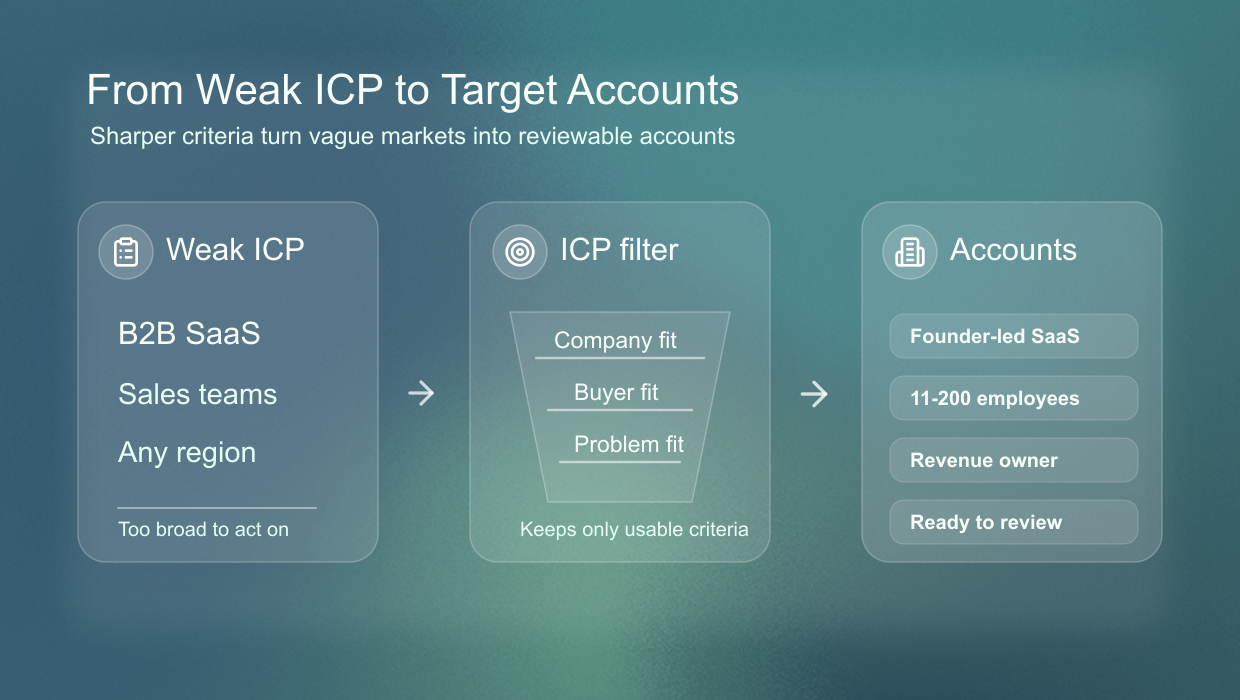
A weak ICP sounds like a market category. For example, B2B SaaS companies with sales teams is too broad because it says little about pain, urgency, buying context, or who inside the account should care.
That kind of ICP usually creates generic outreach. The message has to work for too many companies, so it avoids specifics. The result is a broad list, vague copy, and too much manual qualification after the fact.
Strong ICP example
A stronger ICP might be founder-led B2B SaaS companies with 11-200 employees in the United States or Germany, where the founder or sales lead owns outbound and needs sharper LinkedIn targeting before hiring a full SDR team.
That version is still not perfect, but it gives you a usable filter. You can search for it, review companies against it, and write a message that references a more specific situation.
It also gives you useful exclusions. Enterprise revenue teams, agencies selling outbound services, and consumer apps may all be adjacent, but they should not enter the same first account list if the sales motion is different.
Ideal customer profile vs buyer persona
An ideal customer profile describes the account. A buyer persona describes the person inside that account. You need both, but they answer different questions.
- ICP answers which companies are worth targeting.
- Buyer persona answers which people inside those companies matter.
- ICP filters the account list before messaging starts.
- Buyer persona shapes the message, pain points, and proof.
For example, your ICP might be software companies with 11-200 employees. Your buyer personas might be founders, heads of sales, and revenue leaders inside those companies.
If you start with personas only, you may contact the right title at the wrong company. If you start with ICP only, you may find the right account but miss the person who owns the problem. The two layers work together.
Use your ICP after generation
Once the ICP is generated, use it as a working filter. The next step is to turn the fields into searches, review the people behind the accounts, and write messages that match the audience.
Do not treat the first generated version as final. Use it to create a first list, check the quality of the companies, then adjust the ICP based on what looks too broad, too narrow, or simply wrong.
Turn ICP into search
Use the job titles, departments, industries, company sizes, keywords, and locations as the first inputs for LinkedIn or Sales Navigator searches. Keep exclusions close by so the list does not drift.
The search should mirror the ICP, not replace it. If the query returns many irrelevant accounts, tighten industries, employee ranges, or title groups before you blame the channel.
Turn ICP into messaging
Use the ICP to decide what the message should assume. A message to a founder-led SaaS company should sound different from a message to an enterprise RevOps team, even when the offer is similar.
Good ICP-based messaging mentions the situation, not just the category. The reader should feel that the message was written for companies like theirs, even before you add personal context.
Check ICP trust signals
Before outreach, check whether your LinkedIn profile supports the ICP you want to reach. A strong profile should make the target buyer understand your category, proof, and relevance quickly.
If your profile speaks to a different audience than your ICP, prospects will feel the mismatch. Align the headline, proof, featured content, and recent posts with the accounts you want to reach first.
Export your ICP as CSV
The CSV export gives you a simple ideal customer profile template with attributes, instructions, and generated ICP values. Use it as a review file, share it with your team, or import it into Google Sheets before you refine the final version.
A CSV is useful because it makes the ICP portable. You can review it with a co-founder, add notes from sales calls, compare versions, or keep one column for the current ICP and another for the next test segment.
When the ICP changes, update the sheet instead of leaving old assumptions scattered across tools. A single reviewed template keeps the team aligned on who you are targeting and why.
Frequently Asked Questions
No. An ICP defines the criteria for good-fit accounts. A target account list contains the specific companies that match those criteria.
Yes. Treat the generated ICP as a first draft. Remove broad fields, replace weak titles, add exclusions, and keep the version that matches your real customers.
Narrow the fields that create the most noise first. Start with industry, employee count, department, and exclusions before you change every title or keyword.
No. The generator is useful when you only have a website and rough market context. You can use the first output to start the ICP review instead of starting from a blank page.
Yes. Use the generated fields as inputs for LinkedIn searches, Sales Navigator filters, manual account review, or a shared review sheet.
No. The generator creates fit criteria. Buying signals describe timing, so use them after the ICP is clear to decide which good-fit accounts deserve attention now.
Review the ICP whenever your best customers change, a segment stops responding, pricing changes, or sales calls show the same disqualification pattern repeatedly.
Export the CSV after you have reviewed the generated fields. It is best used for team review, spreadsheet editing, or comparing ICP versions over time.