
LinkedIn Profile Analyzer
Use this free LinkedIn profile analyzer to find what weakens your profile, get a clear score, and fix the sections that cost you replies, trust, or recruiter interest.
Upload your LinkedIn profile PDF
Choose your LinkedIn PDF
or drag and drop it here
How to Use This LinkedIn Profile Analyzer
Use this LinkedIn profile analyzer to find the parts of your profile that cost you replies, recruiter interest, or buyer trust. The goal is not a generic score. The goal is to know what to rewrite first so your profile explains your value faster.
There are two useful paths depending on how deep you want to go. Start with the quick LinkedIn profile checker if you want a fast read on the most visible signals. Use the skill set when you want a more detailed, hands-on profile teardown.
Option 1: Use the free LinkedIn profile checker
Upload your LinkedIn profile PDF, choose the goal that fits your situation, and get a quick AI-assisted review of the sections that usually decide whether someone keeps reading: headline, About section, proof, skills, search language, and trust signals.
- See which section weakens the first impression before your next outreach campaign, job application, or profile update.
- Walk away with clear priorities instead of guessing whether your headline, About section, or proof is the real problem.
- Review the profile content in the PDF export, with email excluded from the analysis context.
Option 2: Get an in-depth profile review with the skill set
For deeper feedback, use the LinkedIn profile analysis skill set. The skill set is better when you want to work through positioning, audience fit, proof, rewrite ideas, and section-by-section improvements with more context than a lightweight web analyzer should collect.
- Turn a vague profile into a sharper narrative for founders, sales profiles, consultants, or job seekers.
- Compare your current profile against the audience you actually want to convert: recruiters, buyers, partners, or prospects.
- Use it when you want rewrite ideas, positioning feedback, and deeper section-by-section guidance instead of only a score.
Check Your LinkedIn Profile Before Others do
A LinkedIn profile can look complete and still fail to explain who you help, why someone should trust you, and what they should do next. The LinkedIn Profile Analyzer page is built around that practical review: clarity, proof, relevance, and buyer-facing trust.
Use the profile check to look past surface completeness. A stronger profile should make your role, audience, offer, outcomes, and next step clear within a few seconds.
That matters because most people do not read a profile from top to bottom. They scan the photo, headline, current role, first lines of the About section, recent activity, and any proof that supports the claim. If those signals do not line up, the visitor leaves with a vague impression even when the profile technically has every section filled out.
For outreach, recruiting, founder-led sales, and consulting, the profile is often the page people use to confirm fit. The job of the profile is not to say everything. It is to make the right reader confident enough to keep reading, reply, book a call, or save the profile for later.
What the LinkedIn Profile Analyzer Reviews
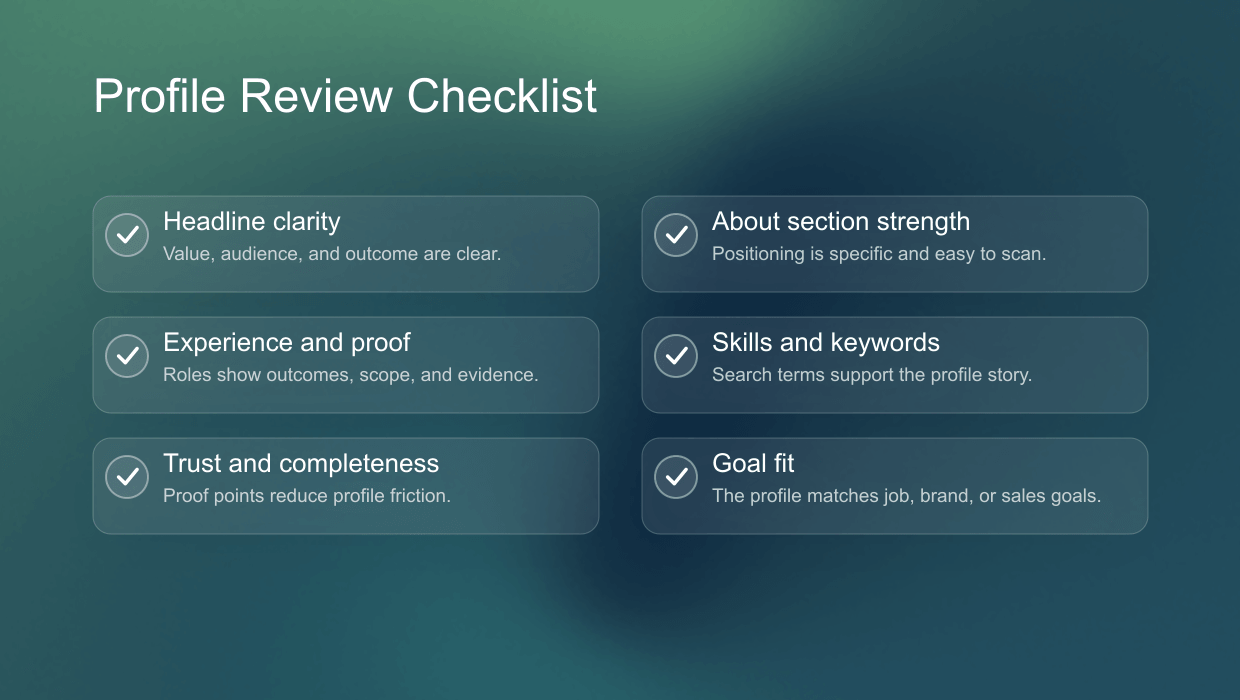
The review should cover every profile section that changes how a recruiter, buyer, founder, or potential partner reads the page. The most important signals are the headline, About section, experience, skills, recommendations, featured content, and call to action.
- Headline clarity: whether the profile explains value, not only job title.
- About section: whether the profile is specific, credible, and easy to scan.
- Experience: whether roles show outcomes instead of only responsibilities.
- Keywords: whether relevant terms appear naturally in the right sections.
- Proof: whether recommendations, media, featured posts, or results support the claims.
- Call to action: whether visitors know what to do after reading the profile.
Headline clarity
The headline is the highest-leverage line on the profile because it appears in search, comments, connection requests, and profile previews. A weak headline usually lists a role or a string of broad claims. A stronger headline explains who the person helps, what problem they work on, or what outcome they are associated with.
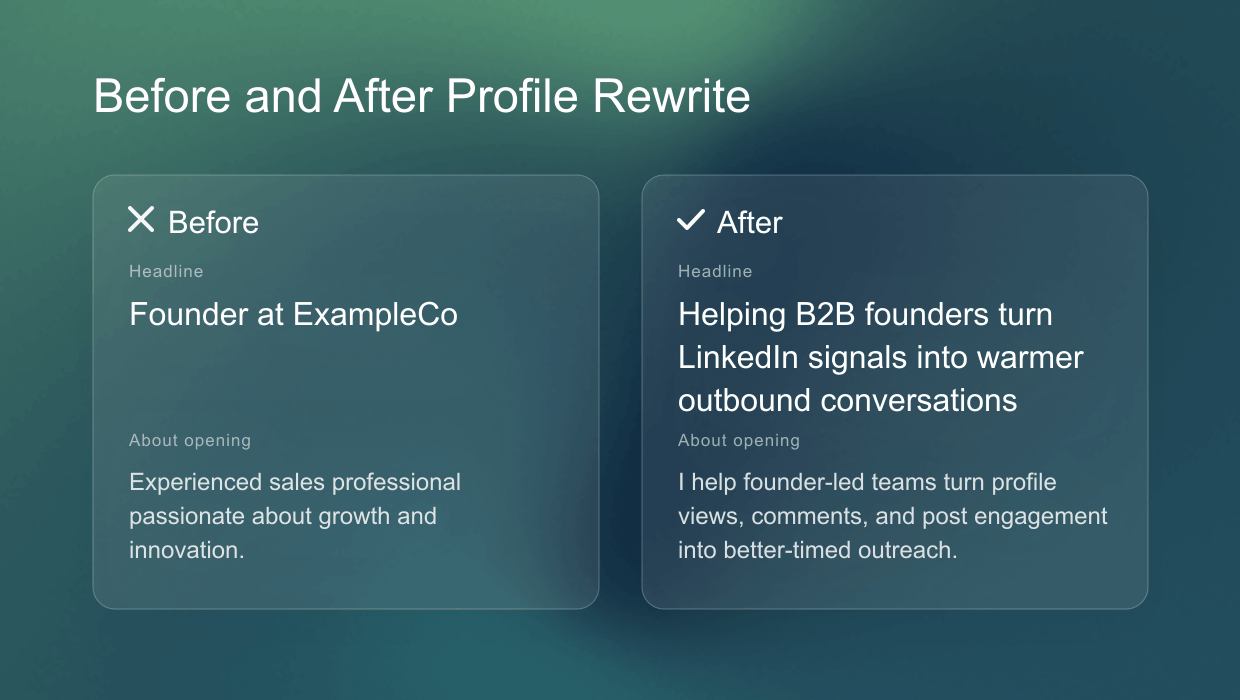
For example, a generic headline such as Founder at ExampleCo tells the reader almost nothing. A clearer version can still be simple: Helping B2B founders turn LinkedIn signals into warmer outbound conversations. The second version gives the reader a category, audience, and reason to keep reading.
About section strength
The About section should not read like a copied resume summary. It should quickly answer why this person is relevant, what they know, who they help, and what proof supports that claim. The first two lines matter most because they decide whether the reader expands the section.
A useful review checks for specificity. If the About section could apply to thousands of people in the same role, it is too generic. Stronger profiles use concrete language: industries, customer types, problems, outcomes, methods, and a clear next step.
Experience, proof, and featured content
Experience entries should show judgment and outcomes, not only a list of responsibilities. For founders and sales teams, this can include market focus, customer segments, product context, or measurable wins. For job seekers, it can include scope, impact, systems owned, and business results.
Featured content and recommendations are useful because they reduce trust friction. A profile that claims expertise but shows no examples asks the reader to trust the claim. A profile with a relevant case study, resource, post, demo, or recommendation gives the reader something concrete to inspect.
LinkedIn Profile Score: What Your Result Means
A useful LinkedIn profile score should not be a vanity number. It should show which section holds the profile back and what to fix first. A weak score usually means the profile is unclear or incomplete. An average score usually means the basics are present but the positioning is generic. A strong score means the profile is specific, credible, and ready for outreach or recruiting visibility.
The score should be read as a prioritization tool. A 55 with a weak headline and strong proof is a different problem from a 55 with a clear headline but no credible proof. The first profile needs sharper positioning at the top. The second needs evidence, featured content, recommendations, or experience details that support the promise.
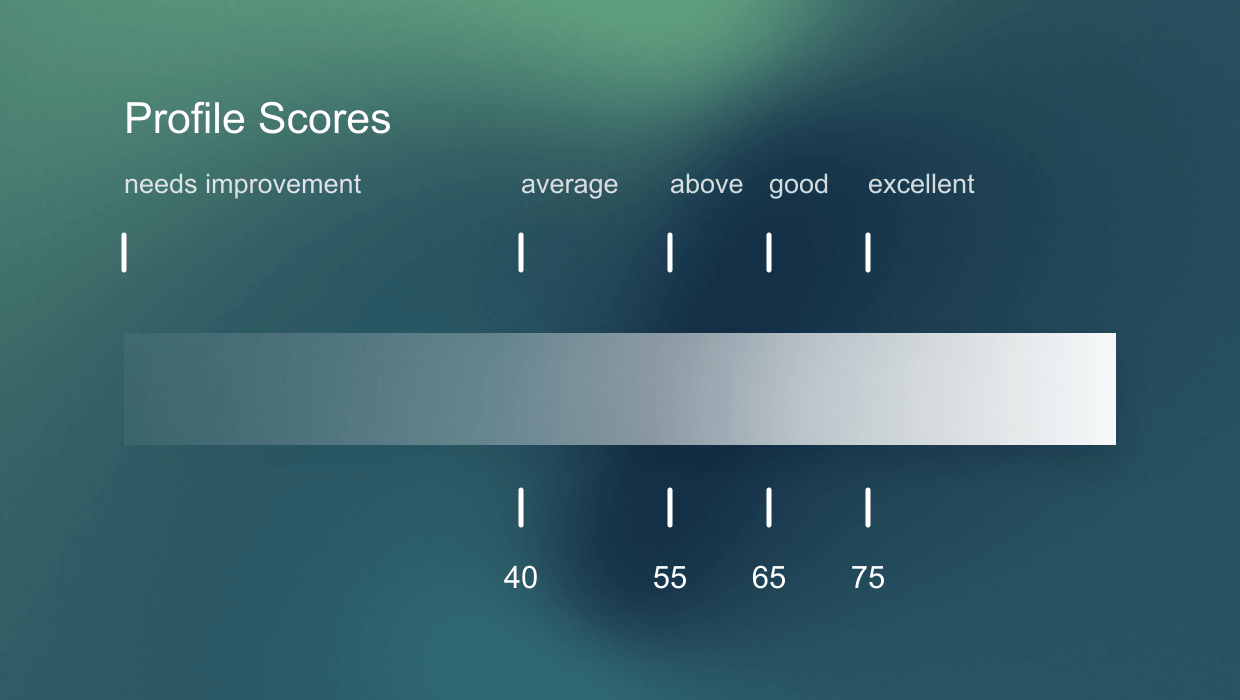
- 0-40: the profile is difficult to understand or missing important trust signals.
- 41-60: the basics are present, but the profile is too generic or inconsistent.
- 61-80: the profile is clear enough to support search, outreach, or recruiting visibility.
- 81-100: the profile has strong positioning, credible proof, and a clear next step.
The goal is not to chase a perfect score. The goal is to know what will improve the profile fastest. For some users, that is a better headline. For others, it is a stronger About section, more specific experience entries, or a clearer call to action.
If you also want a broader LinkedIn presence benchmark, use the Social Selling Index calculator after the profile review. The profile analyzer explains what to fix on the page itself, while the SSI-style check gives a wider view of visibility and activity signals.
LinkedIn Profile Review Tool for Sales, Founders, and Job Seekers
Most LinkedIn profile review tools focus on job seekers. That is useful, but it misses how founders, consultants, and sales teams use LinkedIn. For sales and founder-led outreach, the profile also needs to support trust before a prospect replies.
That is why the page should not only ask whether the profile is complete. It should ask whether the profile fits the audience. A profile that works for a recruiter may not work for a buyer. A profile that works for a founder may not work for a candidate. The same sections matter, but the reader's question changes.
- Job seekers need recruiter visibility, role fit, and clear achievements.
- Founders need category clarity, credibility, and a reason to trust the company.
- Sales teams need buyer relevance, proof, and profile language that matches the outreach motion.
- Consultants and freelancers need niche clarity, proof, and a next step that converts attention into a conversation.
For sales and founder-led outreach
When a prospect receives a connection request or message, they often inspect the sender before replying. The profile needs to confirm that the person understands the buyer's world. Clear positioning, relevant proof, and a non-generic headline make the message feel less random.
This is where Sonarly can make the content stronger than job-search-only competitors. The profile is part of the outreach system. Use the ICP generator to define the audience first, then make sure the profile headline, About section, and proof match that audience.
For job seekers and consultants
Job seekers need a profile that helps recruiters match them to a role quickly. Consultants and freelancers need a profile that shows a niche, a problem they solve, proof of competence, and a low-friction next step. The analyzer should make those differences visible instead of giving every user the same generic checklist.
How to Improve Each LinkedIn Profile Section
Profile optimization works best when every section has one job. The headline should explain value. The About section should make the positioning specific. Experience should show outcomes. Skills and keywords should help the right people understand the profile without stuffing search terms.
- Rewrite the headline around audience, problem, and outcome.
- Make the About section specific enough that the profile does not sound interchangeable.
- Turn experience bullets into outcomes, proof, and concrete responsibilities.
- Add keywords naturally where a human reader would expect them.
- Use recommendations, featured media, or proof points to support the positioning.
Rewrite the headline around value
A good headline is not always long. It should be precise. Role-only headlines are easy to understand but often forget the reader. Keyword-stuffed headlines may rank for more terms but can feel spammy. The best version balances search language with a human promise.
A practical formula is: audience plus problem plus outcome. For example: B2B sales consultant helping founder-led teams turn LinkedIn signals into qualified conversations. The formula does not need to be followed literally, but it helps avoid headlines that are only job titles.
Make the About section specific
The About section should start with the reader's context, not a broad autobiography. Strong openings explain the problem, the audience, and why the profile owner is relevant. The middle can add proof, methods, examples, or experience. The end should tell the reader what to do next.
Avoid long blocks of abstract traits such as passionate, driven, innovative, or results-oriented. Those words do not create trust by themselves. Specific proof does: types of customers helped, systems built, markets served, measurable outcomes, or examples of work.
Use keywords without making the profile robotic
LinkedIn search visibility still depends on language. If the profile never mentions the terms a recruiter, buyer, or partner would search for, it is harder to find. But keyword stuffing damages trust. Keywords should appear where they naturally support the story: headline, About section, experience entries, skills, and featured content labels.
The safest rule is simple: if a keyword helps a human reader understand the profile faster, it belongs. If it is only added to impress an algorithm and makes the sentence worse, remove it.
LinkedIn Profile Analyzer vs Manual Profile Checklist
A checklist is useful for completeness. It can tell you whether a section exists, but it cannot always tell you whether the section is persuasive. A LinkedIn profile analyzer should help prioritize the fixes that make the profile clearer and more credible first.
Manual checklists usually ask yes-or-no questions: Do you have a headline? Do you have an About section? Do you list skills? Those questions are fine for a first pass, but they miss quality. A profile can answer yes to every checklist item and still feel vague.
A stronger review combines structure and judgment. It checks whether the sections exist, then evaluates whether the language is clear, specific, credible, and relevant to the target audience. That is the difference between checking a profile and actually reviewing it.
- Use a checklist when you need to find missing sections quickly.
- Use an analyzer when you need to understand what is weak and what to fix first.
- Use both when preparing a profile before a launch, job search, outbound campaign, or hiring push.
Why Your LinkedIn Profile Matters for Outreach and Brand Building
Your LinkedIn profile does not only matter when someone searches your name. It sits behind almost every LinkedIn motion: search appearances, comments, referrals, connection requests, cold messages, and content views.
That makes the profile a conversion page for your personal brand. If the headline, About section, proof, and recent activity all point to the same outcome, people understand faster why you are relevant.
The profile is the trust check behind every message
Most people do a quick profile check before they reply, accept a connection request, book a call, or refer you internally. They scan for three things: relevance, credibility, and a reason to keep going.
That is why the profile should match the motion around it. A sales profile needs buyer relevance and proof. A founder profile needs category clarity and credibility. A job-search profile needs recruiter fit and concrete achievements.
Better profiles make content and outbound convert better
A clearer profile compounds brand building because comments, posts, referrals, and cold messages all send people back to the same page. If the profile explains the outcome you are known for, each interaction has a stronger landing point. Pair this profile review with the LinkedIn message template generator when you want the message and profile to support the same promise.
Frequently Asked Questions
A LinkedIn profile analyzer reviews profile sections such as the headline, About section, experience, keywords, proof, and call to action so you can see what to improve first.
The score combines structure and quality signals: whether key sections exist, whether the profile is clear, whether proof supports the claims, and whether the profile fits the selected goal.
Yes. A privacy-first profile checker should support user-provided input such as a LinkedIn PDF export, pasted profile text, or screenshots instead of requiring LinkedIn login access.
Yes. A PDF upload keeps the input user-provided and avoids scraping a live profile URL. Sonarly excludes email from the analysis context and does not require a LinkedIn login or browser extension.
A good score means the profile is clear, specific, credible, and ready for the audience you want to reach. The most useful score also tells you which section to fix next.
Review your profile before a job search, outreach campaign, offer change, launch, or major positioning update. For active creators and sales teams, a quarterly check is a practical baseline.
Yes. Job seekers need recruiter clarity, while sales teams and founders need trust, relevance, and buyer-facing proof. The same profile sections matter, but the review criteria change by audience.