
Free LinkedIn Message Template Generator
Create LinkedIn connection requests, InMail, follow-ups, and cold outreach messages from real website and prospect signals. Turn context into short, specific messages people can reply to.
Use the Generator to Get Replies
Start with the website or context you want to reference, choose the message type, pick the call to action, and then review the generated draft before copying it into LinkedIn.
The website gives the draft business context. The message tab changes the pressure and length. The CTA decides whether the output should open a light conversation, ask for a meeting, or offer something useful first.
What Is a LinkedIn Message Template Generator?
A LinkedIn message template generator, or LinkedIn message generator, turns context, message type, and call to action into a short outreach draft. The best version does more than fill placeholders. It helps you write LinkedIn connection requests, InMail, follow-ups, and cold outreach messages that feel specific enough to answer.
What the Generator Should Do
The generator should first match the inbox. A connection request needs restraint, while an InMail can carry more context. After that, the draft needs one real signal and one clear ask.
If the output could be sent to any prospect, it is still too generic. The useful version sounds short, specific, and easy to answer.
Start With Context So Your Message Does Not Sound Copied
Most weak LinkedIn outreach starts with the sender. It explains what the sender sells, wants, or is looking for. Strong outreach starts with the recipient. It shows why the message belongs in their inbox now.
Weak opener: I help B2B companies improve outbound and wanted to connect.
Stronger opener: Saw you are hiring two SDRs in Berlin. That usually means the team is about to tighten lead quality and messaging. I had one idea that may help.
The stronger version works because it has timing. It also gives the recipient a reason to believe the message was written for them, not pulled from a generic sequence.
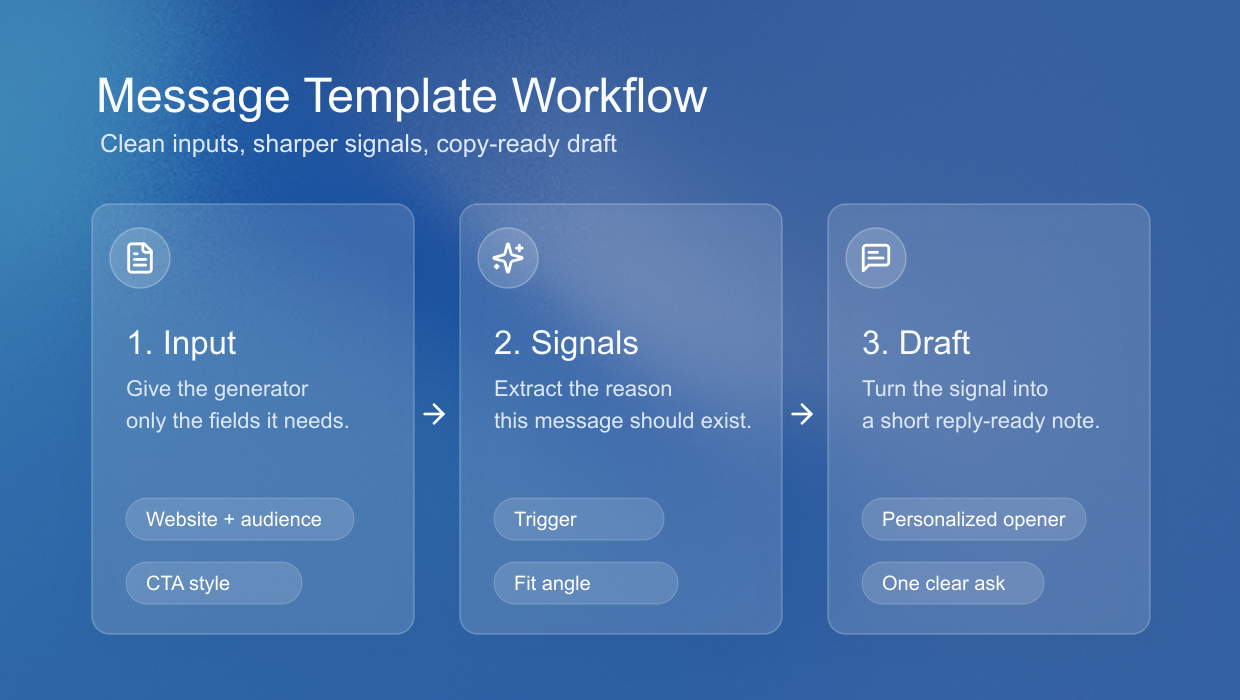
Use a Signal-First Formula People Can Actually Reply To
Use this formula before choosing any LinkedIn message template. It keeps the message grounded and prevents the template from turning into filler.
- Name the signal. Point to the observable event, post, role change, hiring move, funding round, or shared context.
- Explain the relevance. Connect that signal to a real business, career, or relationship reason.
- Make one useful offer. Share an idea, ask one question, suggest a resource, or open a small conversation.
- Use a soft next step. Ask permission before sending more detail, especially in cold outreach.
- Cut one sentence. Most LinkedIn messages improve when you remove the sentence that explains too much.
Choose the Message Type That Matches the Inbox
A LinkedIn connection request message, direct message, follow-up, and InMail template should not sound identical. The inbox, relationship, and pressure level decide how much context you can add and how direct the ask should be.
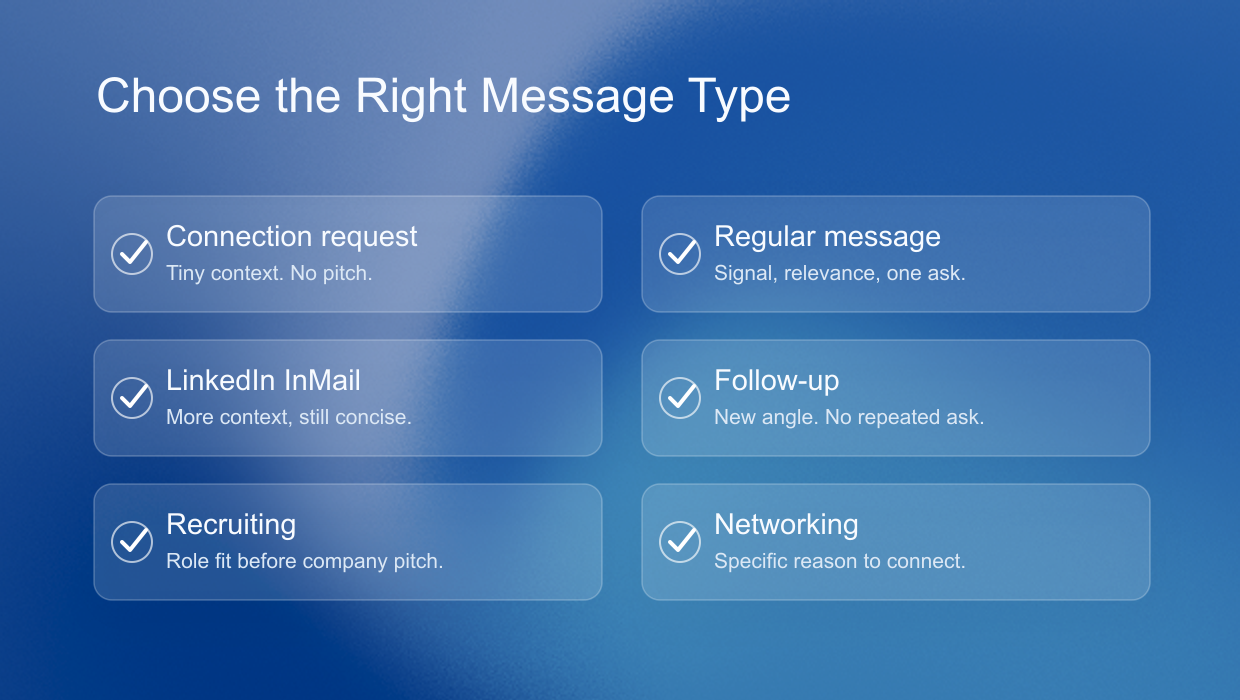
How Long Should a LinkedIn Message Be?
Keep the first LinkedIn message as short as the situation allows. A connection request should feel like permission to start a conversation. A direct message can add one useful signal. LinkedIn Help lists InMail as 200 characters for the subject and 1,900 for the body, but the better InMail template still leads to one clear next step.
LinkedIn Connection Request Message Template
In most cold outbound cases, do not start with a connection request template. Blank requests often avoid the pitch smell, and a weak note can lower acceptance. Use a note only when the signal is obvious enough to explain why the connection makes sense.
Template, only when context is strong: Hi {{firstName}}, noticed {{signal}} at {{companyName}}. It looked relevant to your {{jobTitle}} work in {{industry}}. Open to connecting?
LinkedIn Connection Request Message Character Limit
LinkedIn Help currently documents personalized invitation notes as up to 200 characters. Some account surfaces may show different limits, so write for 200 and treat longer connection request notes as unsafe for reusable templates.
LinkedIn Direct Message Template
Use this after someone accepts, engages, or already knows the sender. The first direct message should reference the signal again, then ask one small question instead of jumping into a demo pitch.
Template: Hi {{firstName}}, noticed {{signal}} at {{companyName}}. Given your {{jobTitle}} role in {{industry}}, is this something your team is already looking at?
LinkedIn InMail Template
Use InMail when you need to reach someone outside your network and the signal is strong enough to justify the credit. Keep the subject short, make the reason clear early, and avoid turning the extra space into a long pitch.
Template: Subject: {{companyName}} timing Hi {{firstName}}, reaching out because {{signal}} at {{companyName}} caught my attention. In {{industry}}, {{jobTitle}} teams often need tighter timing when outreach has to be relevant. Would a short note with the idea be useful?
LinkedIn Follow-Up Message Template
Use a follow-up only when you can add new context. Do not resend the same ask with different wording. The follow-up should make the timing clearer or make the reply easier.
Template: Hi {{firstName}}, quick follow-up because {{signal}} at {{companyName}} still looked relevant. If this is not a priority for your {{jobTitle}} team right now, who is closer to it?
LinkedIn Message Templates for Sales, Recruiting, and Networking
The best template depends on the relationship and the reason for reaching out. The examples below are intentionally short. Add detail only when it makes the message more relevant.
Cold LinkedIn message template for sales
Use when you have a clear business trigger, such as hiring, expansion, a new market, a tool change, or visible demand generation activity.
Template: Hi {{firstName}}, noticed {{signal}} at {{companyName}}. Teams in {{industry}} often review outreach timing when that happens. Is signal-based prospecting a priority for your {{jobTitle}} team?
Make it stronger by replacing the problem area with something specific. Lead quality, SDR ramp time, low reply rates, and founder-led outbound are all more concrete than growth.
Founder-led sales message template
Use when the recipient is a founder, operator, or small team leader who probably handles sales directly.
Template: Hi {{firstName}}, noticed {{signal}} at {{companyName}}. For founder-led sales, timing usually matters more than volume. Would a short signal-based outreach angle be useful?
LinkedIn Recruiter Message Template to Candidates
A LinkedIn recruiter message template has to prove fit quickly. Mention the detail that made the candidate relevant, then give enough role context to make a reply worthwhile.
Template: Hi {{firstName}}, noticed {{signal}} at {{companyName}}. Your {{jobTitle}} background looks relevant to work where {{industry}} context matters. Open to a short overview?
LinkedIn Message Template for Job Seekers
A LinkedIn message template for job seekers should make the target role obvious. State what you want, why you are credible, and what kind of conversation would help.
Template: Hi {{firstName}}, noticed {{signal}} at {{companyName}}. I am exploring teams in {{industry}} and thought your work as {{jobTitle}} might be relevant. Would it make sense to connect?
Networking message template
Networking messages should create a small bridge, not a heavy obligation. The easiest bridge is a specific idea from their work.
Template: Hi {{firstName}}, noticed {{signal}} at {{companyName}}. Your perspective on {{industry}} looks useful for the question I am working through. Open to connecting?
Alumni LinkedIn message template
Shared background helps, but it should not be the whole message. Give the person a specific reason to help.
Template: Hi {{firstName}}, noticed {{signal}} at {{companyName}} and a similar path around {{industry}}. Could I ask one short question?
Before and after LinkedIn message rewrites
A generator should not only produce a message. It should help users understand why one version is stronger than another.
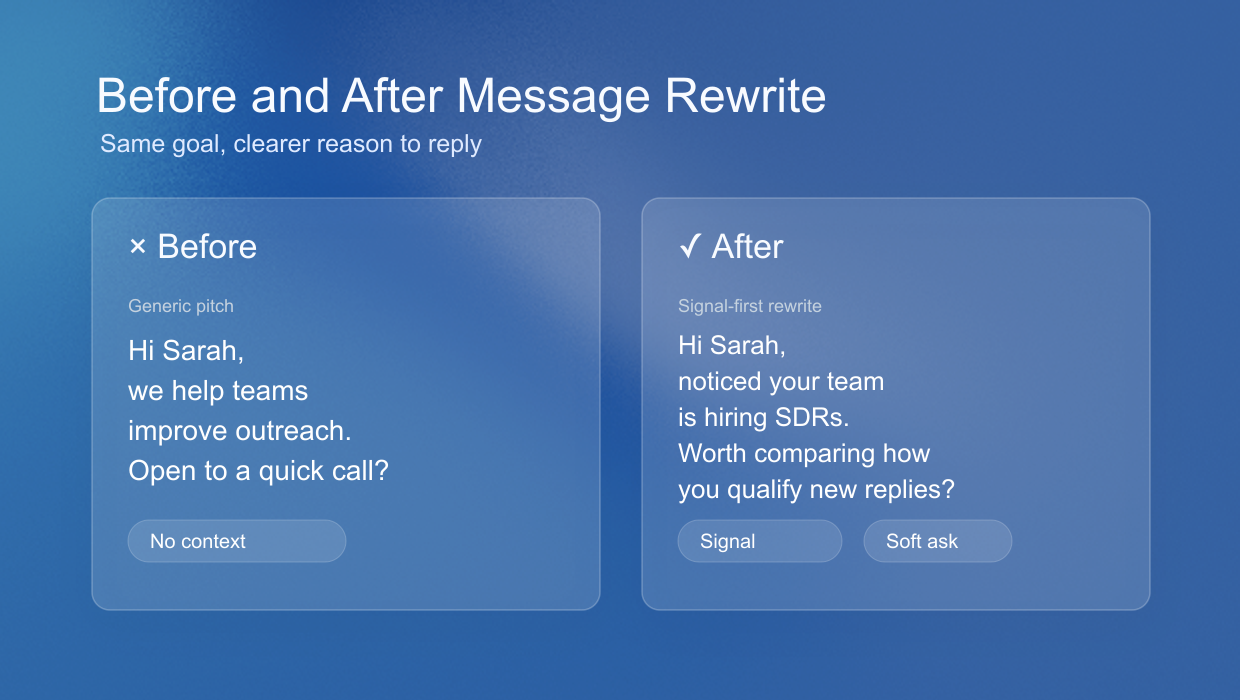
Sales rewrite
Weak: We help companies automate LinkedIn outreach. Do you have 15 minutes this week?
Better: Saw your team is hiring for outbound roles. When teams add reps, message quality often becomes hard to keep consistent. I had one idea for using buying signals before the first touch. Want the short version?
Recruiting rewrite
Weak: I have an exciting opportunity that matches your profile.
Better: Your work on {{signal}} at {{companyName}} stood out. The role needs someone who understands {{industry}} and the {{jobTitle}} motion. Open to a quick overview?
Networking rewrite
Weak: I would love to pick your brain.
Better: Your post on founder-led sales gave me a clearer way to think about early outbound. I am testing something similar and had one specific question about your first channel. Would it be okay to ask?
Personalize LinkedIn Messages Without Sounding Forced
Good LinkedIn message personalization is not flattery. It is evidence. The recipient should quickly see what you noticed, why it matters now, and why your message belongs in their inbox.
Use profile details when they are relevant. A job title can explain why the person owns a problem. A recent post can explain why the topic is timely. A shared connection can explain trust, but it should not become the whole message.
Avoid lines like impressive background, loved your profile, or thought you might be interested. Those phrases are easy to send to anyone. Replace them with a concrete observation and a smaller ask.
Use Two Inputs
The actual tool should not start by asking users to write a full prompt. That makes the generator feel like another blank page. A better flow is simple: first understand the sender's business, then let the user choose the message situation and call to action.
Step 1. Enter Website
The website is the best first input because it gives the tool business context before it writes. From the site, the tool can infer what the company sells, who it serves, how it positions the offer, which proof points matter, and what language already feels native to the brand.
This also keeps the form short. Instead of asking the user to describe the product, ICP, value proposition, and credibility from scratch, the generator can use the website as the base layer and only ask for the missing intent.
Step 2. Choose Type and CTA
After the website is entered, the user should choose the message type from tabs: connection request, direct message, follow-up, or InMail. Each tab should change the length, pressure, and amount of context in the output.
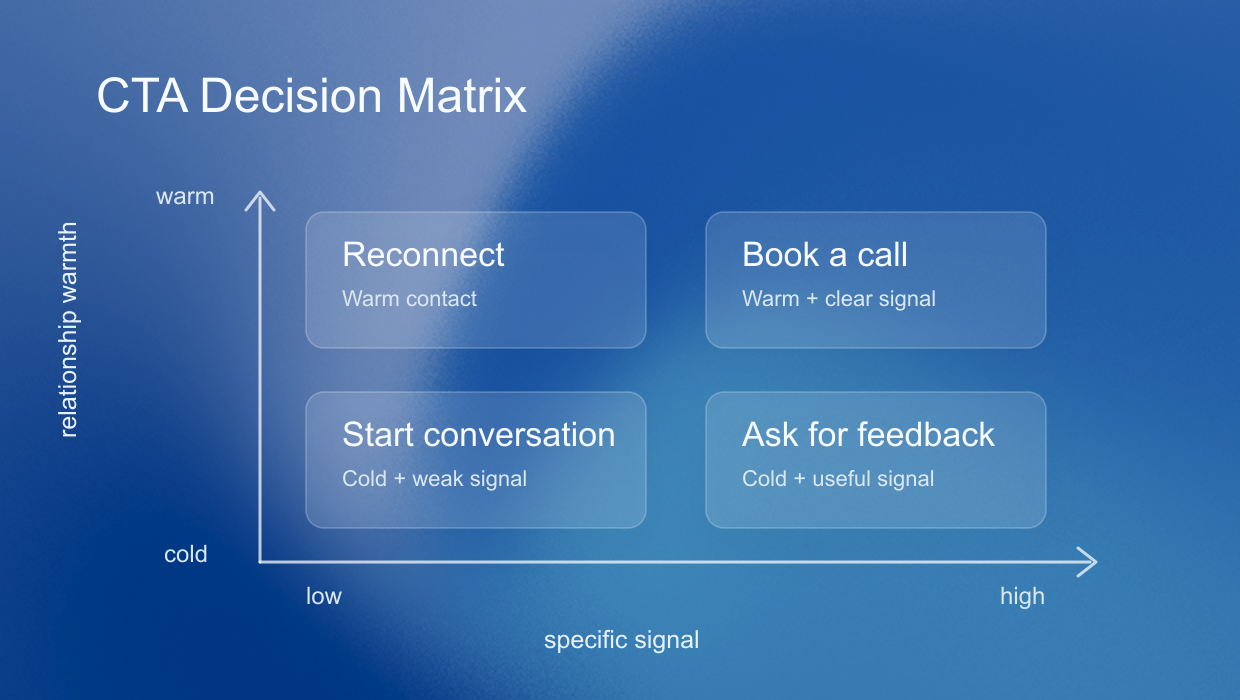
Then the user chooses what the message should do. The CTA should not be a cosmetic ending. It should shape the whole message.
For example, a question CTA should keep the tone light. A meeting CTA needs stronger evidence. A custom CTA works when the next step is a teardown, a resource, or a short follow-up note.
Why CTA Changes Tone
A message that asks a question should sound lighter than a message that asks for a demo. A message that offers a video should create curiosity around what the video will show. A message that sends a lead magnet should explain why the resource is relevant now.
When not to use a LinkedIn message template
A template is the wrong tool when the message needs real relationship context. If you are apologizing, negotiating, replying to a sensitive topic, or asking for a major favor, write the message yourself and use a template only to check structure.
Templates are best for repeatable outreach where the situation is familiar but the recipient still deserves context. The goal is not to remove judgment. The goal is to spend your judgment on the parts that matter.
How Sonarly Uses Signals
This is the core product logic. The website gives the tool business context, the tab gives the format, and the CTA gives the intent. Together, those inputs create a message that feels structured without sounding copied.
A LinkedIn message template generator belongs here because structure is not enough by itself. The signal gives the message a reason to exist, so outreach sounds less like automation and more like a timely conversation.
LinkedIn message template FAQ
A LinkedIn message template generator creates outreach drafts from context such as a website, prospect signal, message type, and call to action. Use it as a LinkedIn message generator when you want a structured draft for connection requests, direct messages, InMail, and follow-ups.
Start with a specific signal, connect it to a real reason for reaching out, and ask for one small next step. The message should be easy to understand in one scan and easy to answer without a meeting commitment.
Use one short reason to connect. Mention a post, role, company signal, shared context, or specific topic. Avoid pitching in the request itself. The goal is to earn permission for a later conversation.
An InMail template can include more context because you are reaching someone outside your network. Use the extra space for relevance and proof, not a longer pitch. A direct message should usually be shorter because the relationship already exists.
Avoid repeating the same ask. Add a new signal, a shorter angle, or a useful resource. A good LinkedIn follow-up message gives the recipient a fresh reason to reply instead of pressuring them for the same answer.
Skip templates for sensitive replies, apologies, negotiations, or major favors. Use templates for repeatable outreach where the structure is familiar, then add judgment to the signal, tone, and ask.