
Cold Email Follow Up Templates for Small Teams
Use 5 practical cold email follow up templates, a timing sequence, and a decision matrix to send only when you have a new reason to reply.


Cold email follow up starts with one new reason
A cold email follow up works only when it adds a new reason to reply. Most follow ups fail because they repeat the first ask, use pressure as the only change, or keep chasing a prospect after the signal has gone stale. The better move is to treat every follow up as a small decision point.
Use this guide as a template library and a quality gate. You will get a 5-step sequence, 7 decision rules, copyable examples, timing guidance, and a stop rule for small B2B teams. The goal is not to send more email. The goal is to send fewer follow ups that are easier to answer.
The strongest cold email follow up sequence starts before copywriting. Score the account, confirm the signal, decide what changed since the first email, and write one useful question. If nothing changed, pause or close the sequence instead of forcing another touch.
Compliance is part of message quality
The FTC CAN-SPAM guide says commercial email must avoid deceptive headers and subject lines, identify the message clearly, include a valid postal address, and honor opt out requests. Build those checks into the sequence before volume increases.
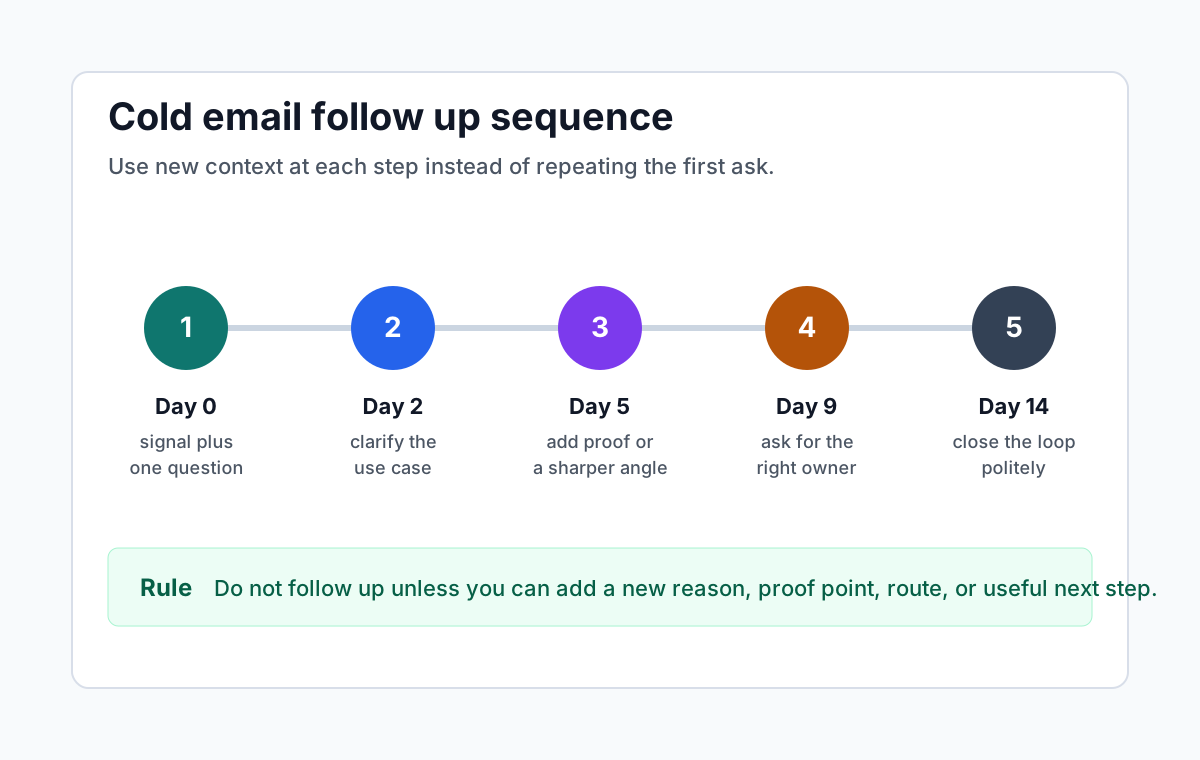
The cold email follow up template set
Use these templates as patterns, not scripts to paste without judgment. Replace every bracket with real context. If you cannot fill a bracket with evidence, that follow up is not ready. A short honest message beats a polished note with no reason to exist.
- Signal follow up, when you can add a recent account or buyer signal.
- Clarifying follow up, when the first email may have named the wrong owner.
- Proof follow up, when a concrete example makes the problem easier to judge.
- Route follow up, when the buyer may not own the workflow.
- Close the loop, when the sequence should end cleanly.
A good cold email follow up template has 4 parts. It names the prior context, adds one new reason, asks one easy question, and gives the recipient a graceful way out. Remove any sentence that does not serve one of those jobs.
1. Confirm the account still deserves a follow up
Do not follow up every cold email by default. First decide whether the account still deserves attention. Check account fit, current timing, buyer relevance, and whether the first email had a clear enough reason. If two of those checks are weak, close or pause instead of sending.
This filter protects your sender reputation and your working time. A follow up to a poor-fit account is not persistence. It is a second weak impression. A follow up to a strong-fit account with a clear signal can be helpful because it makes the next action easier.
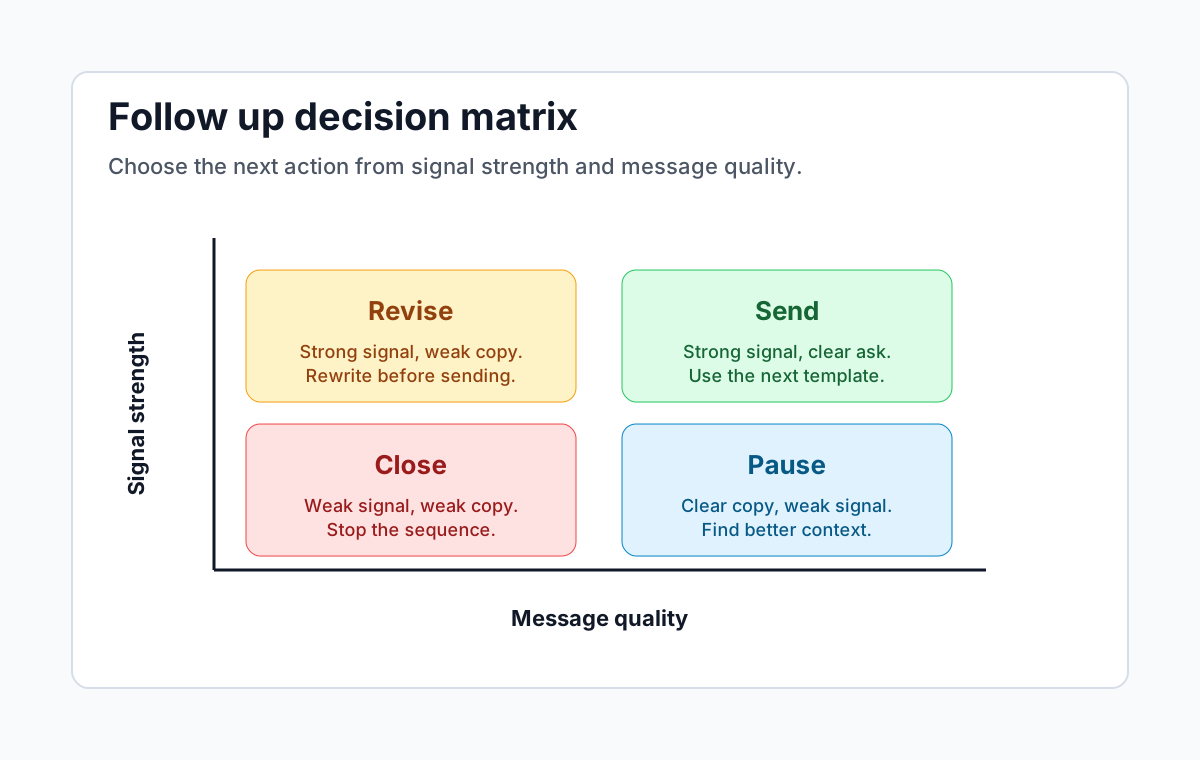
Use a simple 3-minute review. Read the original email, the account note, and the latest signal. Then choose one label. Send, revise, pause, or close. That decision should happen before anyone opens a template document.
Keep the review visible in your CRM or sheet. Record the score, the reason, and the next date. This turns follow up from a memory game into a repeatable outbound sales process. It also helps a founder or small team see which sources create real conversations.
Follow up decision matrix
Use signal strength and message quality to decide whether to send, revise, pause, or close the sequence.
2. Choose the right follow up timing
Timing should match the strength of the reason. A strong signal can support a follow up after 2 business days. A weaker context note may need 4 or 5 business days. A final close-the-loop message usually belongs around day 14, after the recipient had enough time to ignore or redirect the thread.
Do not copy a timing rule without checking buyer context. Enterprise buyers often need more time. Founder-led buyers may respond faster but dislike long threads. If the account is high value and the signal is strong, a slower sequence with better context can outperform a quick sequence with thin copy.
Google sender guidelines put clear expectations on authentication, low spam rates, easy unsubscribe, and wanted mail. Even if your list is small, timing and relevance affect whether people mark your outreach as useful or unwanted.
A practical default for small B2B teams is day 0, day 2, day 5, day 9, and day 14. That gives you 5 touches without making every message feel automated. If you cannot add fresh value at a step, skip that step.
3. Write the signal follow up template
Use the signal follow up when something specific changed after the first email. This might be a job post, new content, a product launch, a leadership update, public engagement, or a second account clue. The signal should explain why you are writing again now.
Template. Hi [first name], quick follow up because [new signal] made the timing look more relevant. In the first note I asked about [workflow]. Is that still owned by your team, or is someone else closer to it?
Why it works. The message is short, names one new reason, and does not pretend the buyer owes a reply. It also gives the recipient a useful escape path. They can correct the owner instead of accepting or rejecting a meeting.
Use this for warm outbound too. Warm does not mean the buyer knows you. It means the email has a visible reason to exist. The signal follow up makes that reason easy to understand without sounding like surveillance.
4. Write the clarifying follow up template
Use the clarifying follow up when the first email may have missed the right person. This is common in founder-led sales, RevOps, sales leadership, marketing operations, and technical buyer groups. The goal is not to pitch harder. The goal is to route the question cleanly.
Template. Hi [first name], I may have aimed this at the wrong owner. I noticed [account context] and had a question about [workflow]. If that sits outside your team, who usually owns it?
This template is useful because it reduces pressure. You are not asking the recipient to evaluate the full offer. You are asking whether your assumption about ownership is correct. That makes the reply easier and keeps the thread respectful.
Avoid adding 3 possible owners in the same email. The reader should not need to solve your routing problem. Name the most likely workflow and ask for a correction. If you need more than 2 sentences of context, your research note is still too broad.
5. Write the proof follow up template
Use the proof follow up when the buyer may understand the problem but not the urgency. Add one proof point, example, or threshold. Do not bury the reader in a case study. The proof should make the question sharper, not turn the email into a brochure.
Template. Hi [first name], one extra thought after my note. Teams usually feel this when [specific trigger] creates [specific cost or workflow issue]. Is [short question] worth checking this quarter?
Proof can be a small operational detail. It might be a 5-step approval process, a handoff delay, a broken account list, a missing signal, or a repeated follow up with no context. Use numbers only when they are true and useful.
Nielsen Norman Group research on web reading patterns shows that readers scan heavily. That applies to busy inboxes too. Put the proof near the top, keep paragraphs short, and make the question obvious.
6. Write the route follow up template
Use the route follow up when the account is strong but the buyer path is unclear. This is different from the clarifying follow up. The clarifying follow up checks whether you aimed at the right person. The route follow up asks for the best path when the current person is likely adjacent to the problem.
Template. Hi [first name], I will keep this brief. [Signal] made me think [workflow] may be active at [company]. If you are not the right person, is there a better owner for a 1-question note?
The route follow up should be used sparingly. If you ask for routing on every account, your list quality is weak. Use it when the account fit and signal are strong enough to justify one respectful routing attempt.
Do not attach files, long links, or multiple calendar options in this email. The job is routing. The easier you make that task, the more likely the recipient is to help or at least leave with a good impression.
7. Write the close-the-loop follow up template
The final follow up should end the sequence, not create guilt. A clean close protects trust and gives the buyer one last easy reply path. It also tells your team to stop spending attention on a thread that has not earned more work.
Template. Hi [first name], I will close the loop here. I reached out because [signal] seemed connected to [workflow]. If this becomes relevant later, I am happy to share the short checklist I used to spot it.
This template works because it closes politely and leaves value behind. It does not claim the buyer is missing out. It does not manufacture urgency. It simply names the reason, stops the chase, and keeps the door open.
After the close, update the record. Mark the sequence closed, save any learning, and remove the account from active follow up until a new signal appears. A new signal can reopen the account. Silence alone should not.
Use Sonarly to keep follow ups signal-based
Sonarly helps small B2B teams turn account context, social activity, ICP clues, and outreach inputs into warmer outbound. The follow up workflow fits that operating model. Start with account fit, confirm the signal, choose the buyer path, then draft a message that has one clear reason to exist.
Before writing follow ups, use the ICP Generator to sharpen who belongs in the sequence. Then use signal notes and message templates to keep each touch specific. The best result is a smaller queue with better reasons, not a larger queue with more automated pressure.
Cold email follow up templates are most useful when they make the decision easier. Send when you have a new reason and a clear ask. Revise when the signal is strong but the message is weak. Pause when the copy is clear but the signal is thin. Close when neither side is strong enough.
Use the same quality review before every scheduled send. The review should take less than 5 minutes. If it takes longer, the account note is probably too vague or the message is trying to do too many jobs at once.
- Keep the subject line honest and tied to the thread.
- Use one short context line before the question.
- Remove any claim you cannot prove from the account note.
- Check that the recipient can answer with yes, no, or a referral.
- Stop the sequence when the reason is gone.
That last rule matters. A good outbound sales process creates useful restraint. It tells you when to send and when to stop. When your team can explain both decisions, follow up becomes a quality system instead of a calendar habit.
Sources
FTC CAN-SPAM compliance guide for commercial email identification, subject line, sender, postal address, and opt out requirements.
Google sender guidelines for authentication, spam-rate, unsubscribe, and wanted-mail expectations.
Nielsen Norman Group reading-pattern research for scannability and front-loaded copy guidance.
Frequently asked questions
For most small B2B teams, 3 to 5 touches is enough. Send only when each message adds a new reason, proof point, route, or useful next step. Stop earlier when account fit, signal strength, or buyer path is weak.
A practical default is day 2, day 5, day 9, and day 14 after the first email. Strong signals can support a faster follow up. Weaker context needs more space or a pause until a better reason appears.
Name the prior context, add one new reason, ask one easy question, and give the recipient a graceful way out. Avoid repeating the first email with different wording. The follow up should make replying easier.
The best template depends on the reason. Use a signal template when something changed, a clarifying template when ownership is unclear, a proof template when urgency needs support, and a close-the-loop template when the sequence should end.
Automate reminders and data hygiene, but keep the send decision tied to fit, signal, and message quality. A follow up that adds no new reason should be paused or closed, even if an automation could send it.